Your Cart is Empty





View other products by NoiseWorks

Clean, Restore, Level and Shape Your Sound
NoiseWorks Complete Bundle Advanced brings together VoiceAssist Advanced, GainAim, TranSplit and Enshape for vocal and dialogue restoration, detailed editing, real-time level control and dynamics shaping. Take a recording from its raw state toward a mix-ready performance, then refine the punch, body and movement of your tracks with dedicated mixing tools.
Start with VoiceAssist Advanced to reduce background noise and room reverb, restore tonal balance, even out loudness and control breaths, sibilance and mouth noise. Move on to GainAim for real-time level riding, TranSplit for transient and sustain balancing, and Enshape for threshold-free compression and expansion. Whether you are preparing dialogue, polishing a lead vocal or tightening drums and bass, the bundle gives you complementary tools for each stage.
VoiceAssist Advanced: Vocal and Dialogue Cleanup, Restoration and Editing
VoiceAssist Advanced combines AI-assisted restoration and editing in one workspace. Its seven modules cover Clean, Low End, Gate, Dynamics, Breath, Sibilance and Mouth Noise, helping you tackle common recording problems without building a long chain of separate corrective processors.
The Clean section reduces background noise and reverb, with adjustable processing so you can tailor the cleanup to each recording. High-frequency recovery helps restore clarity to muffled voices, while Low End tools address missing warmth, unwanted resonance and unnecessary low-frequency content. Use these restoration tools to bring recordings made under different conditions closer together before shaping the final mix.
The Dynamics module analyzes the performance and creates editable level automation toward your LUFS target. Speed, smoothing and peak controls let you refine the response, while infinite lookahead helps the processing account for upcoming changes. Rather than relying entirely on heavy compression, you can establish a more consistent level while retaining control over the performance.
AI vocal detection identifies speech and the pauses between phrases for intelligent gating. Dedicated Breath, Sibilance and Mouth Noise modules help control distracting inhalations, harsh consonants and mouth clicks. Detected regions and automation stay editable, so you can adjust boundaries and processing to suit individual moments rather than accepting a fixed automatic result.
Work directly in a compatible DAW through ARA, capture audio with Transfer Mode when ARA is unavailable, or use the included standalone application. VoiceAssist processes audio locally without cloud uploads, keeping restoration and editing within your own workflow.
GainAim: Real-Time Level Riding
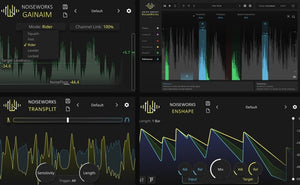
GainAim brings vocals and dialogue toward a target loudness as they play. Its real-time processing and low latency make it useful for both mixing and live performance. Five modes, ranging from Rider to Squash, offer different approaches to level control, while NoiseFloor and Channel Link provide additional control over its response. Keep a vocal present in the mix or explore automatic level adjustment on other sources.
TranSplit: Balance Punch and Body
TranSplit separates a sound’s transient and sustain components, letting you shift the balance between attack and weight with a single slider. Add definition to a kick, emphasize the punch of percussion or bring out the body of a bass part without navigating a full set of compressor controls. Sensitivity, Length and Trigger settings let you fine-tune the response to your material.
Enshape: Threshold-Free Dynamics Shaping
Enshape shapes attack and sustain using two envelope followers rather than a fixed threshold. Its input and target envelopes give you a direct way to reshape dynamics, combining compression and expansion in one tool. Control a vocal performance or sculpt the movement of other sources without relying on signal level alone to determine when processing takes place.
Highlights
System Requirements
Host Compatibility and Workflow
VoiceAssist Advanced supports ARA and Transfer Mode. ARA-compatible hosts listed by NoiseWorks include Pro Tools 2024.10 or later, Cubase, Nuendo, Reaper, Studio One, LUNA, Logic Pro under Rosetta, Samplitude Suite 2026.0.2 or later and Sequoia 2026.0.2 or later. Without ARA, use AudioSuite or Transfer Mode, or work in the standalone application.
GainAim, TranSplit and Enshape
These plugins support Intel and Apple Silicon Macs running macOS 12.0 or later, and 64-bit Windows 10 version 1909 or later. Available formats are VST3, AU and AAX. Use a compatible host supporting the appropriate plugin format.
Bundle Compatibility
To run every plugin in Complete Bundle Advanced, your system must meet the VoiceAssist Advanced requirements above, including Apple Silicon on Mac or a dedicated NVIDIA or AMD graphics card on Windows.