Your Cart is Empty



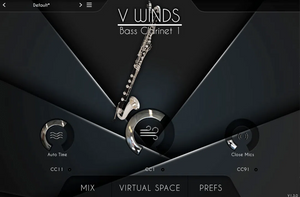
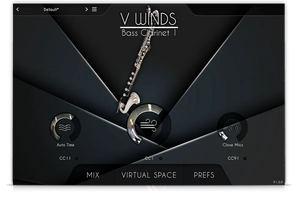
Two bass clarinets
View other products by Acousticsamples

SAMPLING MEETS MODELING, AGAIN & AGAIN
The VWinds Bass Clarinets can be purchased on their own (as part of a pair) or as part of the VWinds Clarinets bundle. You can find more information, demos and videos on the VWinds Clarinets page
The H.A.T. - Airflow Control
Thanks to our proprietary H.A.T. (Harmonic Alignment Technology), VWinds Clarinets is not just another heavily multisampled instrument - you can play articulations yourself just like a live player would, using only a MIDI controller (or even by simply drawing the automation in!). There are no complicated keyswitches involved to play staccatos or fast legatos or anything else - it's just a case of playing it live as you think it should sound.
Simply play a note, adjust the air flow, and that's it! Vibrato is automated by default, but this can be customized or even just controlled manually.
How does sampling + modeling work, and why does it sound so natural? Read sampled, modeled or hybrid.
Authentic Vibrato
We carefully measured the different parameters that change when a player uses vibrato, and we combined everything into a hyper-realistic and extremely adjustable vibrato, specifically tailored for each instrument.
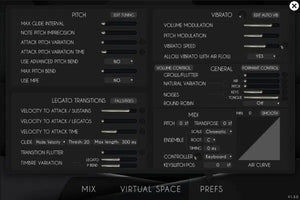
There are multiple ways to control the vibrato: automatic, automatic depending on time, and completely manually. Vibrato can also be replicated to an extent by using just the air flow, in order to replicate the diaphragm movement of a live musician.
Legato Transitions
We spent considerable time and effort carefully extracting every minor detail of recorded transitions in order to give a variety of customizable legato transitions, and to help make the Clarinets as indistinguishable as possible from a live performance.
These transitions range from lightning-fast changes to extremely slow bends, with and without extra attack. We made sure to cover all of this, and you’ll see that this is all controllable in the interface. The legato behavior can even be randomized to help give a more human-like performance.
The legato transitions are based on real recorded transitions, but if you prefer a synthetic sound for particular projects, you have the option to choose fully-modelled transitions as well.
Multi-Microphone Recording
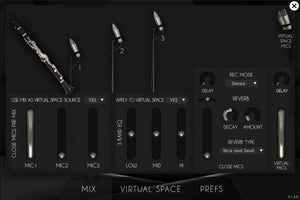
Recording a woodwind instrument can be done in various ways and at different positions. We used 3 different microphone positions to offer a variety of sounds whilst maintaining the crystalline sound of our VSeries instruments.
Various microphone positions can produce even better results when using the "virtual space”, detailed below, where there are 4 options for microphone configurations.
You can also apply reverb and EQ within the interface to prepare the sound to your taste before even starting with external plug-ins.
Virtual Space
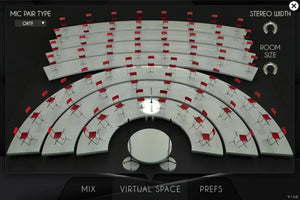
The virtual space perfectly reproduces what a real recording of an ensemble would be, using convolution.
When recording an orchestra, a pair of microphones is usually placed in front of the musicians and they naturally take position in the stereo field depending on where they are in the room.
The Virtual Space does exactly the same thing: you can place the musician wherever you like on a big stage.
When using this with multiple tracks, you immediately have the feeling of being in front of a real woodwind section.
Our default space for V2 is based on recordings from the award-winning Stoller Hall.
Advanced Editing
There are an endless number of ways to play a woodwind instrument, and we had to make a careful choice on the default settings based on our interaction with world-class players, but many of the options can be customized to your taste.
Furthermore, most settings can be randomized for more human-like and unpredictable results.
Formant control / Microtuning / Volume adjustment
VWinds is already highly customizable, but to add even more variety, each harmonic of the sound can be adjusted.
For even more versatility, the pitch and volume of every note is adjustable, meaning the instrument can be completely tailored to your needs.
Keyboard, Breath Controller, Wind Controller and MPE support
VWinds can be played using a keyboard by selecting the notes on the keyboard and controlling the air flow with a MIDI controller, such as a modulation wheel or a breath controller.
You can also use a wind controller like an EWI, an Aerophone, a Sylphyo or any other brand - in order to do this the appropriate controller must be selected from the controller menu in the MIDI section.
Ensemble
If multiple instruments are loaded at the same time, their notes will be performed at exactly at the same time.
We added some smart features that can change the timbre of the instruments, transpose everything by a fixed interval and also act on the MIDI performance.
For example, you can have all 8 instruments with a different transposition value playing the same C minor scale, so no matter what you play on the keyboard, it will sound in key.
System Requirements
Mac (10.14 or later intel or arm processor)
PC (windows 10 or later)
in standalone or as a plugin (VST / VST3 / AU / AAX ) and in 64 bits only