Your Cart is Empty



View other products by NoiseWorks

VoiceAssist Standard is an all-in-one vocal processing plugin that combines intelligent leveling, AI-powered gating, breath control, and de-essing in a single offline-analysis pass. It replaces the typical 4-plugin vocal prep chain (gain rider → gate → de-breather → de-esser) with one unified workflow.
VoiceAssist Standard is the direct successor to DynAssist — existing DynAssist owners receive VoiceAssist Standard as a free upgrade.
Who is this for?
Includes
Dynamics Section
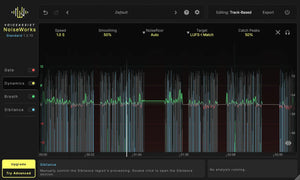
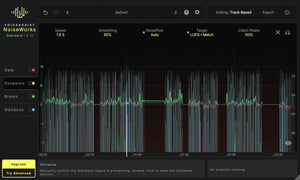
Every word and syllable counts — whether it’s dialogue or vocals. The Dynamics section analyzes your performance and writes a custom volume automation tailored to your settings. Want a subtle volume ride no one will notice? Use High Speed mode. Need aggressive leveling for modern vocals or rap? Switch to Fast Speed for a clear, consistent presence that cuts through. Work in LUFS-I or LUFS-S, with integrated peak control to trigger compression only when it’s actually needed.
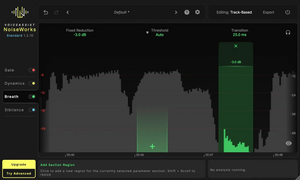
Breath & Sibilance Section
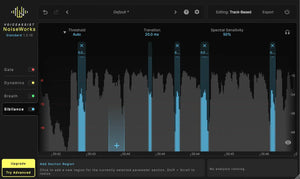
Harsh sibilance and distracting breaths can make even great performances sound unprofessional.
VoiceAssist gives you intelligent detection with flexible editing:
Everything stays editable. The result stays natural, clean, and mix-ready.
Gate Section
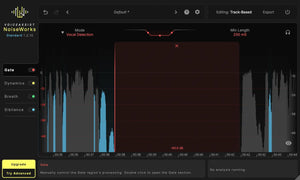
The content-aware Vox Gate only works when it really has to. Instead of relying on a fixed threshold, VoiceAssist uses intelligent voice and silence detection to avoid over-processing and unnatural cuts — even across comped takes or changing mic positions. Prefer full control? Switch to a traditional threshold-based mode and fine-tune boundaries to match your recording situation.
Features
System Requirements
Host Compatibility and Workflow
VoiceAssist supports ARA, Transfer Mode and insert workflows. ARA-compatible hosts listed by NoiseWorks include Pro Tools 2024.10 or later, Cubase, Nuendo, Reaper, Studio One, LUNA, Logic Pro under Rosetta, Samplitude Suite 2026.0.2 or later and Sequoia 2026.0.2 or later. Transfer Mode provides a workflow for hosts without ARA support.
The standalone application is exclusive to VoiceAssist Advanced and is not included in this edition.