Your Cart is Empty


View other products by iZotope

Split the mix. Cut the noise.
iZotope Photon brings AI-powered stem separation and audio enhancement into a fast, focused workflow. Available as a standalone application and an ARA plugin, Photon lets you break finished mixes into editable parts, separate speakers, remove distracting noise, and restore speech clarity. Its 12 custom-trained machine learning models run locally on your GPU, keeping your audio on your computer while you work.
Start with a finished song, a noisy interview, or a video clip that needs cleaner dialogue. Drop in your file, choose a model, preview the section that matters, and adjust the balance before exporting. From rebuilding a drum loop to bringing a distant voice forward, Photon helps you get useful results without hunting down the original session.
Demix: Turn finished audio into editable stems
Photon's Demix models give you independent control over elements that were previously locked together. Isolate vocals for a remix, rebalance instruments, separate a film scene into its key components, or split a conversation into individual speakers.
Music 4 Stems and Music 4 Stems Ultra
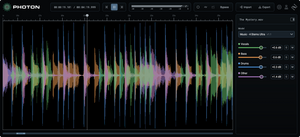
Separate a song into voice, drums, bass, and other elements. Music 4 Stems is designed for quick edits and rebalancing, while Music 4 Stems Ultra provides finer separation when an isolated part needs to stand on its own. Prepare DJ edits, create backing tracks, study individual parts, or pull out an instrument for sampling without needing the original multitrack session.
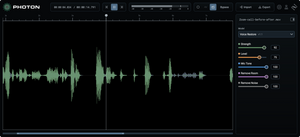
Voice Separator
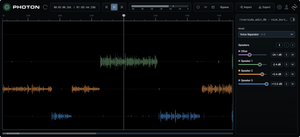
Split up to six voices into individual stems, with separate control over room tone and background noise. For podcasts, interviews, panels, and roundtable recordings, you can export the stems to your DAW or video editor for independent mixing and timing adjustments.
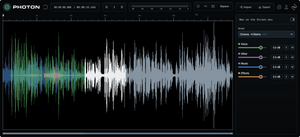
Cinema 4 Stems
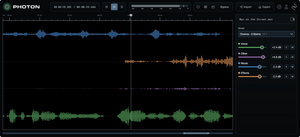
Separate a scene into voice, music, sound effects, and other elements. Isolate dialogue, replace background music, or prepare material for localization and shorter edits. When working from video, import the file directly and export back to video while retaining the source video's specifications.
Drums 5 Stems
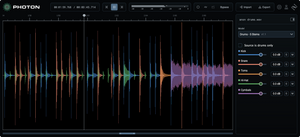
Break a drum bus or full song into kick, snare, hi-hat, toms, and cymbals. Adjust the balance of a finished groove, isolate a snare for sampling, or prepare individual drum elements for replacement and further processing.
Voice 2 Stems
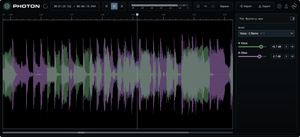
Separate voice from music for a straightforward two-part workflow. Create instrumental or karaoke versions, prepare vocal practice tracks, isolate a vocal, or lower background music beneath spoken content.
Denoise: Clean recordings from the real world
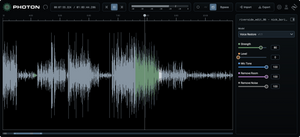
Photon includes purpose-built enhancement models for dialogue recorded in challenging environments. Reduce distracting noise and echo, improve vocal clarity, and make recordings from rooms, streets, and exposed outdoor locations easier to use.
Voice Restore
Bring distant or muffled speech forward with control over noise, levels, microphone tone, and echo. Enhance voiceovers, podcast dialogue, webinars, online courses, and recordings made with phone or laptop microphones while retaining the surrounding context you need.
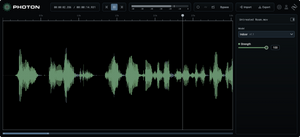
Indoor and Indoor Noisy
Use Indoor to reduce room noise and echo in remote calls, untreated interview spaces, conference rooms, and training videos. Indoor Noisy is tailored to more demanding environments, including loud room tone, running equipment, busy event spaces, and recordings captured at low levels.
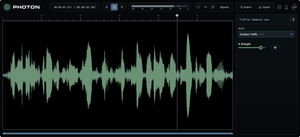
Outdoor, Outdoor Traffic, and Outdoor Wind
Choose Outdoor for general background noise in field recordings, travel videos, and outdoor events. Outdoor Traffic targets motor and urban noise in street interviews and on-location reports. Outdoor Wind is built for tougher exposed conditions, including coastal shoots, cycling footage, and field recordings made without a windscreen.
Local GPU processing and fast previews
Photon's full-scale models process audio locally on your GPU rather than uploading it to the cloud. Your audio stays on your device, with no cloud-processing credits or upload cutoffs interrupting your session. Jump to any point in a clip and begin processing there to hear results without waiting for the entire file to finish.
The full Photon engine inside your DAW
The ARA plugin brings Photon into a compatible DAW timeline. By working from the entire clip rather than a real-time buffer, Photon can use the full context of the file. Run multiple models together and compare results, with a processed-audio cache carrying results across instances of the same clip.
New models, without reinstalling
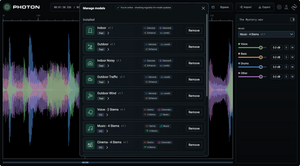
Photon's Model Manager lets you download new models as they become available and try them immediately in your current project, without reinstalling the application.
Easy audio and video delivery
Import an audio or video file, make your adjustments, and export in the format your project needs. Audio export options include WAV, FLAC, and MP3. For video sources, Photon can export in the source format with the video content left untouched, so you can improve the soundtrack without rebuilding the picture edit.
System Requirements
Mac: macOS 14 or later. Apple silicon required, M1 chip or later; Intel Macs are not supported. 8 GB unified memory minimum, 16 GB recommended. Uses CoreML for processing.
Windows: Windows 10 or later, 64-bit. Intel Core i5 processor, 5th generation or better. 8 GB RAM minimum, 16 GB recommended. GPU required with at least 4 GB VRAM.
Storage: 10 GB or more of free disk space recommended.
Plugin Format and Hosts:ARA2. Mac hosts include Pro Tools, REAPER, Cubase, and other ARA2 hosts. Windows hosts include Pro Tools, Sequoia, Samplitude, REAPER, Cubase, and other ARA2 hosts.
Internet: An internet connection is required for Model Manager. Contact Boris FX Support for an offline installer.