Your Cart is Empty




View other products by Synchro Arts

What’s new in RePitch 2 Standard?
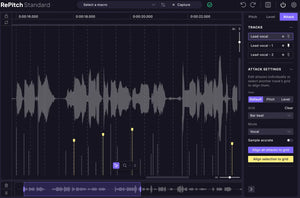
SmartAttack
RePitch 2 Standard introduces SmartAttack, a breakthrough tool that intelligently detects and aligns vocal phrasing to the grid—without sacrificing the natural character of the performance. It automatically adjusts note starts for tighter timing, making it easier than ever to achieve polished, professional results while keeping vocals feeling authentic and expressive.
Multi-track Editing
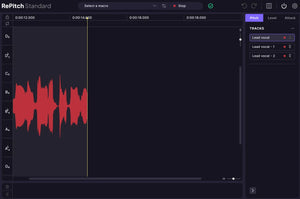
Edit multiple vocal takes side by side in a single unified view. Multi-track editing lets you visualize harmonies, doubles, and stacks all at once, making it simple to align timing, pitch, and expression across performances. Perfect for vocal producers and engineers working with layered arrangements, this update speeds up editing and improves consistency across tracks.
Floating toolbar
RePitch 2 Elements introduces a new floating toolbar that keeps all your essential tuning tools just a click away. Designed for speed and flexibility, it lets users access pitch, timing, and correction controls from anywhere in the workspace—streamlining the creative flow from start to finish.
Improved note editing
Editing has never been smoother. RePitch 2 Elements now offers more fluid note control—making it easy to move, resize, or delete notes with precision. Enhanced snapping and visual feedback help artists make faster, more musical decisions during tuning sessions.
Reimagined interface
The updated interface delivers a modernized look with improved clarity and visual contrast. Users can better visualize pitch curves and transitions, while the cleaner layout minimizes distractions and enhances focus during editing.
Faster navigation and hotkeys
Efficiency takes a leap forward with new hotkeys and navigation improvements.Producers / engineers can zoom, scroll, and adjust notes faster than ever, cutting down on repetitive actions and making RePitch 2 Elements a more responsive, production-ready tool for professionals.
Advanced, precise pitch correction
Professional, natural-sounding vocal tuning—precision editing tools make our vocal pitch-correction plugin the top pick for pro audio engineers.
The pro’s choice for pitch correction
Get perfectly tuned vocals that don’t sound processed or artificial. Flaws and imperfections can be removed without compromising the feel or vibe of the performance.
Superior sonic quality
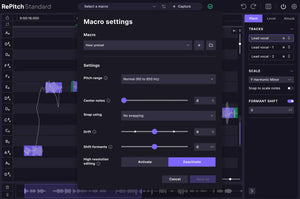
Experience the most natural-sounding signal processing available, with the flexibility to automatically process using smart macros for quick results, or manually adjust pitch with precision tools for surgical accuracy.
Time correction
Effortlessly refine the timing of your vocals with RePitch Standard’s precise time-editing tools. SmartAttack intelligently analyzes vocal transients, allowing you to quantize performances for perfectly aligned phrasing and a natural, rhythmically consistent pocket.
Intuitive workflow
Easy-to-understand UI, tight DAW integration (and ARA-compatible, including Pro Tools) and unique, industry-first SynchroLink feature enables a connection to VocAlign Pro – enabling VocAlign to automatically correct vocal stacks with every new tuning or timing change of the lead in RePitch
Features
Everything in Elements
Pitch analysis, tuning macros, time editing, resizable GUI and ARA-compatibility
Advanced tuning tools
Precision editing tools for super-natural tuning, including: Shaper Tool, Draw Tool and Smooth Join
Warp Points Tool
Detailed timing changes, with ability to augment or diminish note lengths
NEW! SmartAttack
Intelligently detect and lock vocals to the grid with natural feel
NEW! Multi-track editing
Edit multiple vocal takes side-by-side in a single view
Formant Shifting
Creative mixing tool, changing the timbre of a vocal without affecting the pitch—available to use globally, as a selection or note-by-note
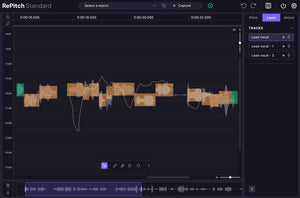
Level Display
Control the amplitude of your vocal, with ability to remove sibilance and plosives from a vocal
SynchroLink connection
Unique connection to VocAlign Pro allows for automatic time and pitch alignment with new edits
System Requirements
Apple macOS
*Apple Silicon Version of Logic does not support ARA plug-ins
Microsoft Windows